
Understanding the Specifics of Android
The single greatest advantage to owning an Android mobile device is its customization. The nature of the Android’s open source model is what gives third party app developers the ability to create a wide range of add-on functionalities that extend beyond the OS’s intrinsic capabilities.
This includes everything from widgets to live wallpapers that can be used to create the kind of intensely personalized experience that’s not available with stock iOS devices. It also includes the ability to side-load or download applications from sources other than the official Google Play market, like the Amazon Appstore, or even direct from app developer websites. Ultimately, this makes for a greater number of applications that are available for Android devices.
Just a few examples of Android’s customization possibilities include the ability to install time or weather widgets to a device’s lock screen, to set or change which specific programs launch certain types of files, to change default fonts, and to install non-factory dialer and SMS apps. The pull-down notification system that comes standard with the Android OS also enables users to turn on and off Wi-Fi, Bluetooth, GPS, and audio with a single tap instead of having to access system preferences. By design, the Android operating system has a file management system similar to PCs and Macs that delivers a more “hands on” experience that may be more conducive to using a smartphone like a computer rather than a mobile device.
While owning a smartphone with a highly customizable interface may make Android the obvious choice for techie individualists, it does have its fair share of drawbacks. Freedom to customize can imbue the device’s interface with something of a shattered uniformity that won’t appeal to everyone and could be difficult for some users to keep up with.
For example, applications that were built to function well on earlier operating systems may not work as well when a user upgrades to the latest OS version. There’s also the consideration that Google Play app policies aren’t as strict as those of Apple, which means that applications may not always work at peak performance and could compromise security.
Because Android is used by a variety of manufacturers like Samsung, HTC and Sony, it’s become the most widely used OS in the world, powering more than a billion mobile devices. But this doesn’t necessarily mean it’s the best. It also doesn’t make it the worst. It just means it’s the most often used.

Understanding the Specifics of iOS
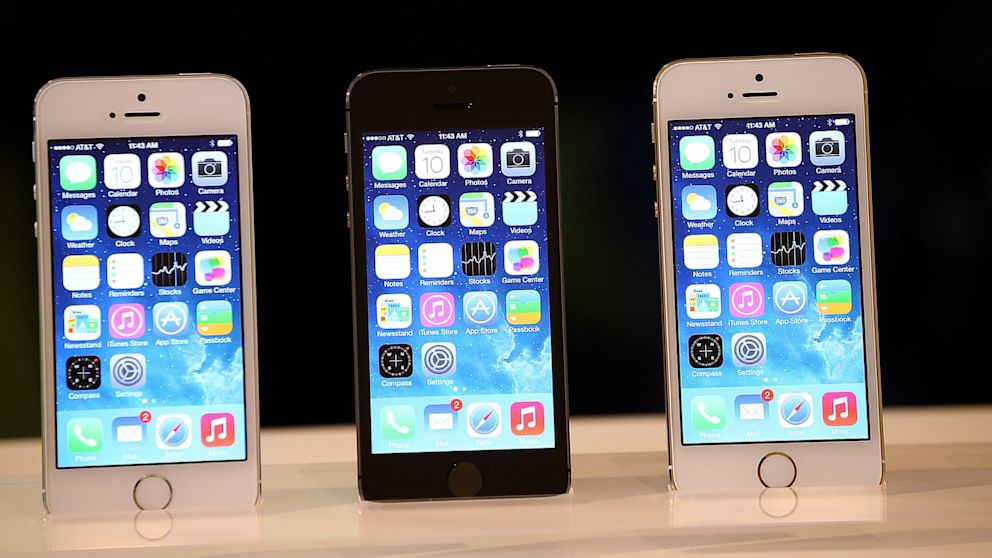
iOS owns a strong reputation for being quick, clean and secure. Ease of use is frequently mentioned when discussing the benefits of iOS, and it’s evident by the simplistic layout and vibrant colors of its user interface that Apple places a strong emphasis on uniformity and consistency.
Despite the fact that Apple holds a far smaller share of the app marketplace, it’s frequently the first stop for many newly released applications. In many cases, applications that arrive first to the Apple App Store may take a long time to eventually work their way to Google Play and the Android market. In some cases, they never do. Much of this can be attributed to the credibility factor associated with iOS applications, and the desire among some app developers to achieve a higher level of legitimacy, since Apple exercises strict quality control on the apps it accepts into its marketplace.
While there are many who view Apple’s tight app controls as a benefit that brings higher levels of security, quality control and performance when operating system upgrades take place, not all iOS users are thrilled by it. There are some whose desire for greater freedom of choice in both apps and customizability has caused them to level criticism at Apple for being altogether too selective in what it lets users do, namely, in the inability to personalize the interface beyond minor cosmetic allowances like wallpapers.
Side loading of apps is nonexistent in iOS; the only applications that can be downloaded to an iOS device are those that come from the Apple App Store. There is a way around this, but it requires users to jailbreak their devices – something that Apple says may result in operating system instability, reduced battery life, the inability to download future updates, and the risk of all-out device inoperability.
Despite these limitations and restrictions – and more than likely because of them – iOS has maintained a sterling reputation as a stable and user-friendly interface that provides a readymade mobile experience. In today’s plug-and-play world where less is more and the desire to tinker with electronics to make them work the way they’re supposed to has dissipated to near-nil, iOS could emerge the platform of choice for a particular segment of users. At the end of the day, everything hinges on user preference.
The Similarities Between iOS and Android (and Why They’re More Alike than Not)
One of the greatest misconceptions that exist among users who have experienced one operating system and not the other – as well as those who have yet to try either and are confused by the constant back-and-forth arguments between iOS and Android devotees – is that the two platforms offer vastly different experiences. This may have been the case five or six years ago, but in the ensuing years there’s been a gradual convergence that’s drawn both iOS and Android closer together than a lot of people realize.
Both systems function similarly in that they easily facilitate the installation of applications that perform desired functions. Both use very similar touch and gesture conventions for device operation. Both have similar navigation structures and user interfaces that, when compared side by side, are more alike than alien to one another.


Wow very nice!
ReplyDeleteInteresting
ReplyDeletei go to the android
ReplyDeleteThis comment has been removed by the author.
ReplyDeleteFor me, apple is the best <3
ReplyDeleteandroid is the best sorry :)
DeleteYeah i agree android is the best
ReplyDelete